



PyDotBot#
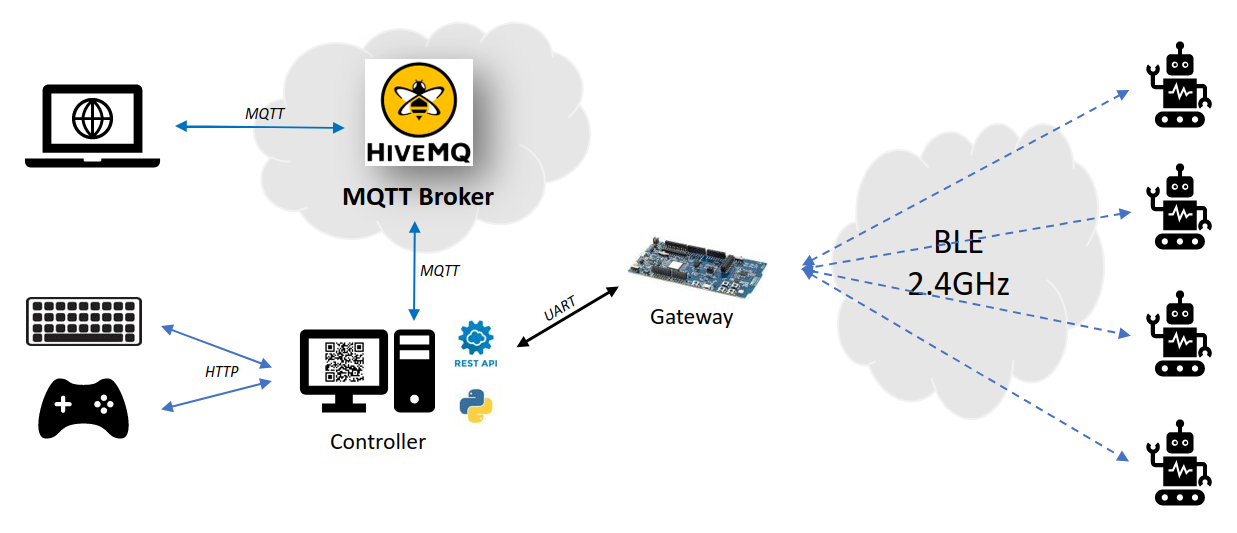
This package contains a complete environment for controlling and visualizing DotBots.
The DotBots hardware design can be found here (PCB). The firmware running on the DotBots can be found here.
This package can also be used to control devices running the SailBot firmware application.
Installation#
Run pip install pydotbot
Setup#
Flash the required firmwares on the DotBots and gateway board (use an nRF52833DK/nRF52840DK/nrf5340DK board as gateway), as explained in the DotBots firmware repository.
Usage#
A single dotbot CLI dispatches to every workflow — controller,
testbed ops, calibration, demos:
dotbot --help
Usage: dotbot [OPTIONS] COMMAND [ARGS]...

  Control DotBots: drive robots, run testbed experiments, calibrate, demos.

Commands:
  controller  Start the controller (adapter + REST/WS + dashboard).
  sim         Standalone simulator (equivalent to controller --adapter dotbot-simulator).
  testbed     Testbed-side ops: provision, status, start/stop, OTA flash, monitor.
  calibrate-lh2 LH2 calibration: capture, apply, export (serial-side / single device).
  demo        Built-in research demos (qrkey phone bridge, ...).
  fw          Firmware-developer workflow (scaffold/build/flash). Not yet implemented.
  keyboard    Drive a DotBot from the keyboard (live).
  joystick    Drive a DotBot from a joystick (live).
Some subcommands need optional runtime deps:
pip install pydotbot[testbed]    # adds swarmit (testbed orchestration)
pip install pydotbot[provision]  # adds intelhex (used by `dotbot testbed provision`)
pip install pydotbot[calibrate]  # adds opencv-python + textual (LH2 calibration TUI + exporter)
pip install pydotbot[all]        # all of the above
Calibration (dotbot calibrate-lh2) and provisioning (dotbot testbed provision) are vendored in-tree, but their heavyweight runtime deps
(textual / opencv-python / intelhex) are gated behind extras so the
core install stays lean.
Starting the controller#
Run dotbot controller --help for the full flag list (adapter, MQTT,
HTTP port, map size, etc.). By default the controller expects the serial
port to be /dev/ttyACM0 on Linux — use --port to override (e.g.
--port COM3 on Windows).
With --webbrowser, a tab opens at
http://localhost:8000/PyDotBot. The
page lists available DotBots, lets you select and control one, and
exposes a virtual joystick and RGB LED control.
Use --config-path for a TOML config file:
# Use settings from the config file
dotbot controller --config-path config_sample.toml
# Use config file but override port and adapter (simulator example)
dotbot controller --config-path config_sample.toml -a dotbot-simulator
CLI flags override config-file values when both are provided.
The legacy dotbot-controller, dotbot-keyboard, and dotbot-joystick
console scripts remain as backwards-compatible aliases for one
deprecation cycle. Prefer dotbot <subcommand> for new code.
Firefox users:
If the webapp is not working, press Ctrl + L, type about:config,
and set network.http.http2.websockets to false.
Tests#
To run the tests, install tox and use it:
tox